Background
Two distinct moments come to mind when I first considered building my own C2 infrastructure.
The first was when I had just started experimenting with the Sliver C2 framework. I had this idea to prank a friend (with their permission, of course). My grand plan? Drop a loader script on their machine and set a registry key that would trigger it on reboot. The script would download and execute shellcode to initiate a connection to my Sliver server. It worked perfectly in local testing, and I was proud of how clean it was.
So, I spun up a Python web server, waited for my opportunity to strike, and it came. With their computer left unlocked, I dropped the script, set the registry key, and waited. Later that day, when I was with them, I checked my listener, expecting a callback. Aaaaaaaaand… nothing.
Later, when debriefing with one of my other red teamers, I realized, in hindsight, that I had lacked consideration for basic networking. Although I had set the IP address correctly, it was my local IP on a college campus where I was constantly switching between access points, and because of that, my IP kept changing. Subsequently, the value of public-facing C2 infrastructure for real-world operations beyond isolated lab environments became more than clear to me.
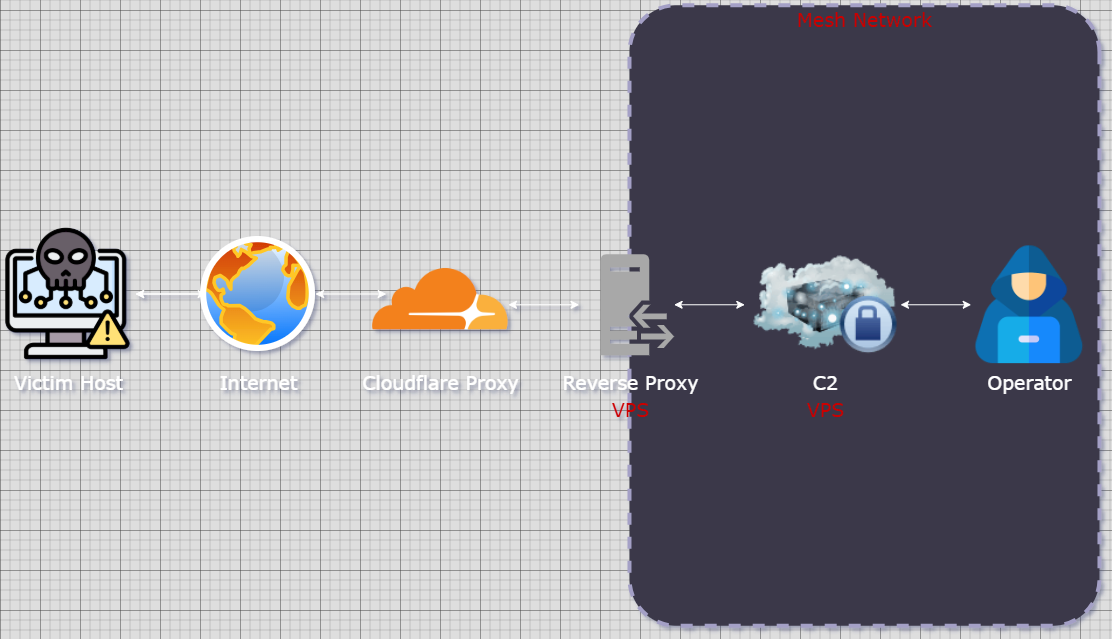
The second moment was during prep for the Information Security Talent Search (ISTS) competition. As part of the red team, two teammates and I were responsible for building public-facing C2 infrastructure so we could blend in with legitimate traffic while red teaming other schools. I was excited, as this was exactly the kind of niche I wanted to find myself growing and developing in. But when it came time to actually set up the infrastructure, I found myself frequently confused, falling behind, and frustrated.
Thankfully, as of recently I’ve had some time to get started on some of my personal projects I’ve been putting off, my own public C2 being one of them, so I’ll walk you through some of what I have so far.